---
title: "JFrog Platform"
slug: "jfrog-platform"
updated: 2025-07-02T16:38:05Z
published: 2025-07-02T16:38:05Z
canonical: "docs.databee.buzz/jfrog-platform"
---
> ## Documentation Index
> Fetch the complete documentation index at: https://docs.databee.buzz/llms.txt
> Use this file to discover all available pages before exploring further.
# JFrog Platform
The JFrog Platform is a unified DevOps platform that manages the entire software supply chain, offering end-to-end visibility, security, and control. It integrates various JFrog services into a single pane of glass, providing a seamless experience for developers and administrators. The platform's core components include Artifactory, Xray, and Mission Control. For more information, refer to [JFrog’s website](https://jfrog.com/platform/).
**Integration Method:** Data Collector (syslog)
**Tables**: Entity Management (3004), Group Management (3006), HTTP Activity (4002), User Access Management (3005)
This integration supports the following events.
| **Event** | **Description** |
| --- | --- |
| Audit Trail Logs | Create/Delete/Update on group, user, permission, token on JFrog Platform. |
This integration supports the following versions.
| Linux Version Tested | Ubuntu 22.04 LTS, RHEL 8.8 |
| --- | --- |
| Data Collector API version | 0.6-62-d2aa70a |
## Prerequisites
- The user should have a [compatible version](https://docs.databee.buzz/docs/data-collector#system-requirements) of the system in which we can configure the data collector.
- The user should have access to DataBee console.
## Configuration Overview
1. [Configure syslog on data collector](/user-manual/docs/jfrog-platform#configure-syslog-on-data-collector) machine.
2. [Configure syslog on JFrog machine](/user-manual/docs/jfrog-platform#configure-syslog-on-jfrog-machine).
3. [Configure JFrog Platform feed](/user-manual/docs/jfrog-platform#databee-configuration) in DataBee console.
## Configure syslog on Data Collector
The Data Collector must first be installed on this machine. Instructions can be found at [Data Collector article](https://docs.databee.buzz/docs/data-collector).
1. Login to the Linux host machine.
2. Run the command **sudo nano /etc/rsyslog.conf** with **Administrator** privileges.
3. Enable following highlighted UDP lines with port that you want to expose to client machines to forward logs. *For e.g, port 51442 is opened here for clients to forward logs.*
4. Add **if ($msg contains '|C|TKN|' or $msg contains '|C|USR|' or $msg contains '|C|GRP|' or $msg contains '|C|PRM|' or $msg contains '|D|TKN|' or $msg contains '|D|USR|' or $msg contains '|D|GRP|' or $msg contains '|D|PRM|' or $msg contains '|U|TKN|' or $msg contains '|U|USR|' or $msg contains '|U|GRP|' or $msg contains '|U|PRM|') then @0.0.0.0:8082** at the end of the file to expose auth logs to 8082 port. This port will be used for Linux feed configuration in DataBee UI.
5. Save and close the file. 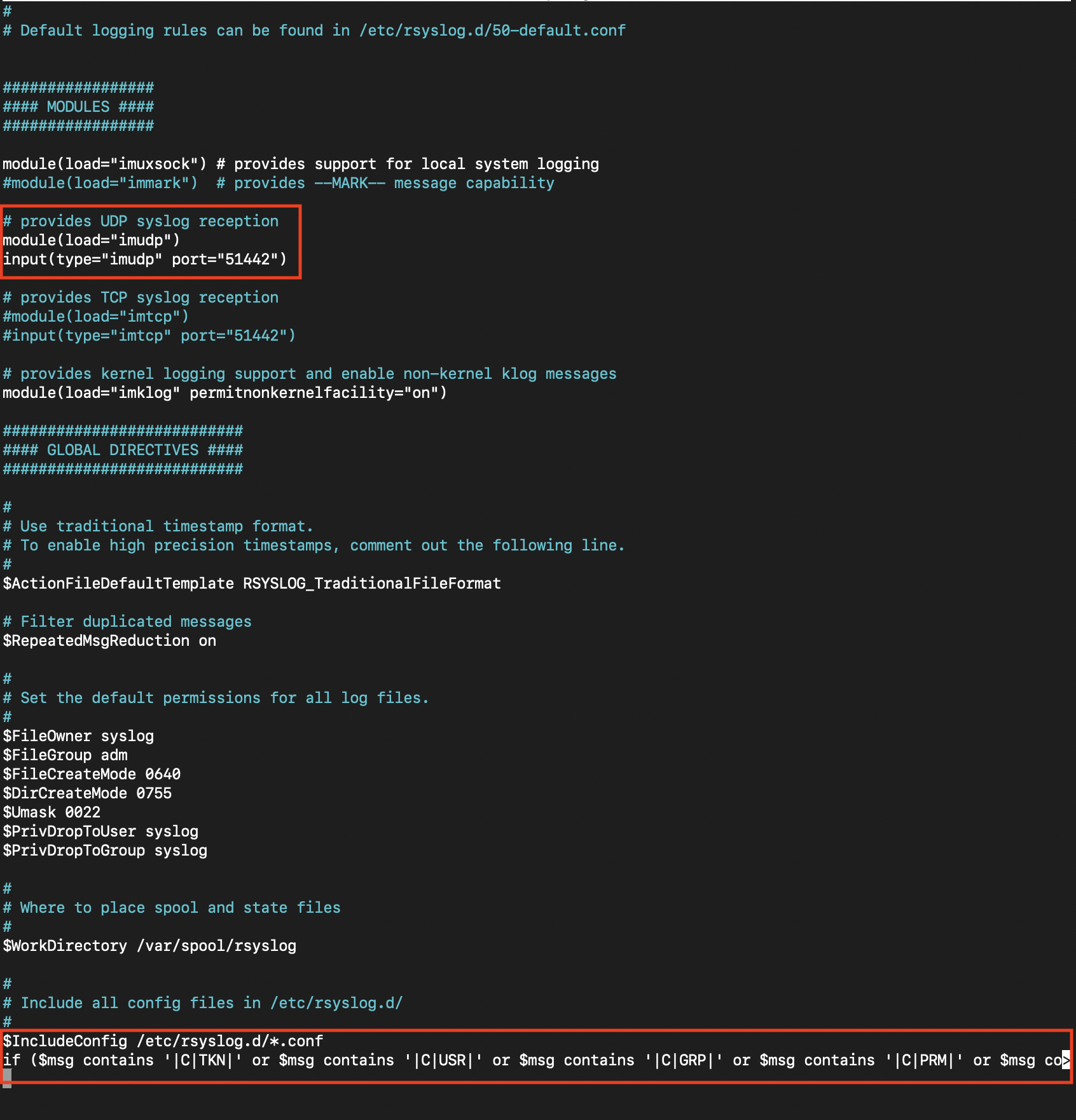
6. Run the following command to restart syslog service **sudo service rsyslog restart**.
## Configure syslog on JFrog machine
1. Login to Linux client machine in which JFrog instance is hosted and from where you want to forward the Audit Trail Logs to DataBee.
2. Run the command **sudo nano /opt/jfrog/artifactory/var/etc/access/logback.xml** with **Administrator** privileges.
3. Paste the following lines:
1. Add the following syslog appender to the logback xml (next to the other appenders):
```plaintext
localhost
SYSLOG
%formattedTenantId%d{yyyy-MM-dd'T'HH:mm:ss.SSS, UTC}Z|%formattedCustomUberTraceId|%X{audit.performingUserIp}|%X{audit.performingUser}|%X{audit.loggedinPrincipal}|%X{audit.entityName}|%X{audit.securityEventType}|%X{audit.securityEvent}|%X{audit.dataChanged}%n
```
2. Add the following appender to the output:
```plaintext
```
3. Save and close the file.
4. Restart the service: **systemctl restart artifactory.service**.
4. Run command **sudo nano /etc/rsyslog.conf** with **Administrator** privileges.
5. Enable following highlighted UDP lines with port. This is required for JFrog platform to deliver the log in the client syslog from where logs will be then forwarded to host.
```plaintext
# Provides UDP syslog reception
$ModLoad imudp
$UDPServerRun 514
# Provides TCP syslog reception
$ModLoad imtcp
$InputTCPServerRun 514
```
6. Add the following at the end of the file to send auth logs to host machine’s 51442 port.
```plaintext
if ($msg contains '|C|TKN|' or $msg contains '|C|USR|' or $msg contains '|C|GRP|' or $msg contains '|C|PRM|' or $msg contains '|D|TKN|' or $msg contains '|D|USR|' or $msg contains '|D|GRP|' or $msg contains '|D|PRM|' or $msg contains '|U|TKN|' or $msg contains '|U|USR|' or $msg contains '|U|GRP|' or $msg contains '|U|PRM|') then @:51442
```
7. Save and close the file.
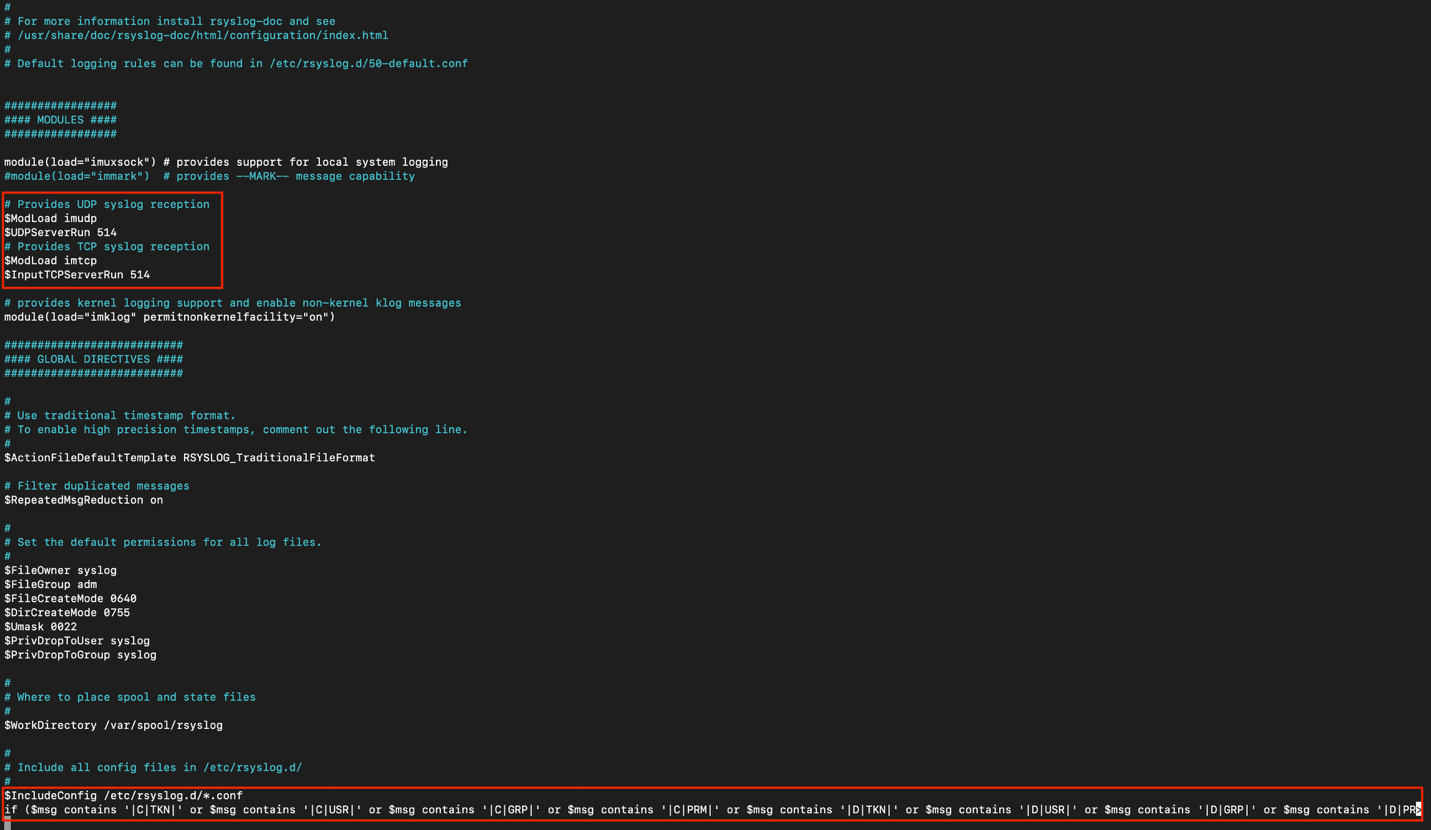
8. Run the following command to restart syslog service **sudo service rsyslog restart**.
## DataBee Configuration
1. Login to the DataBee UI, navigate to **Data** > **Data Feeds** and click the **Add New Data Feed** button. 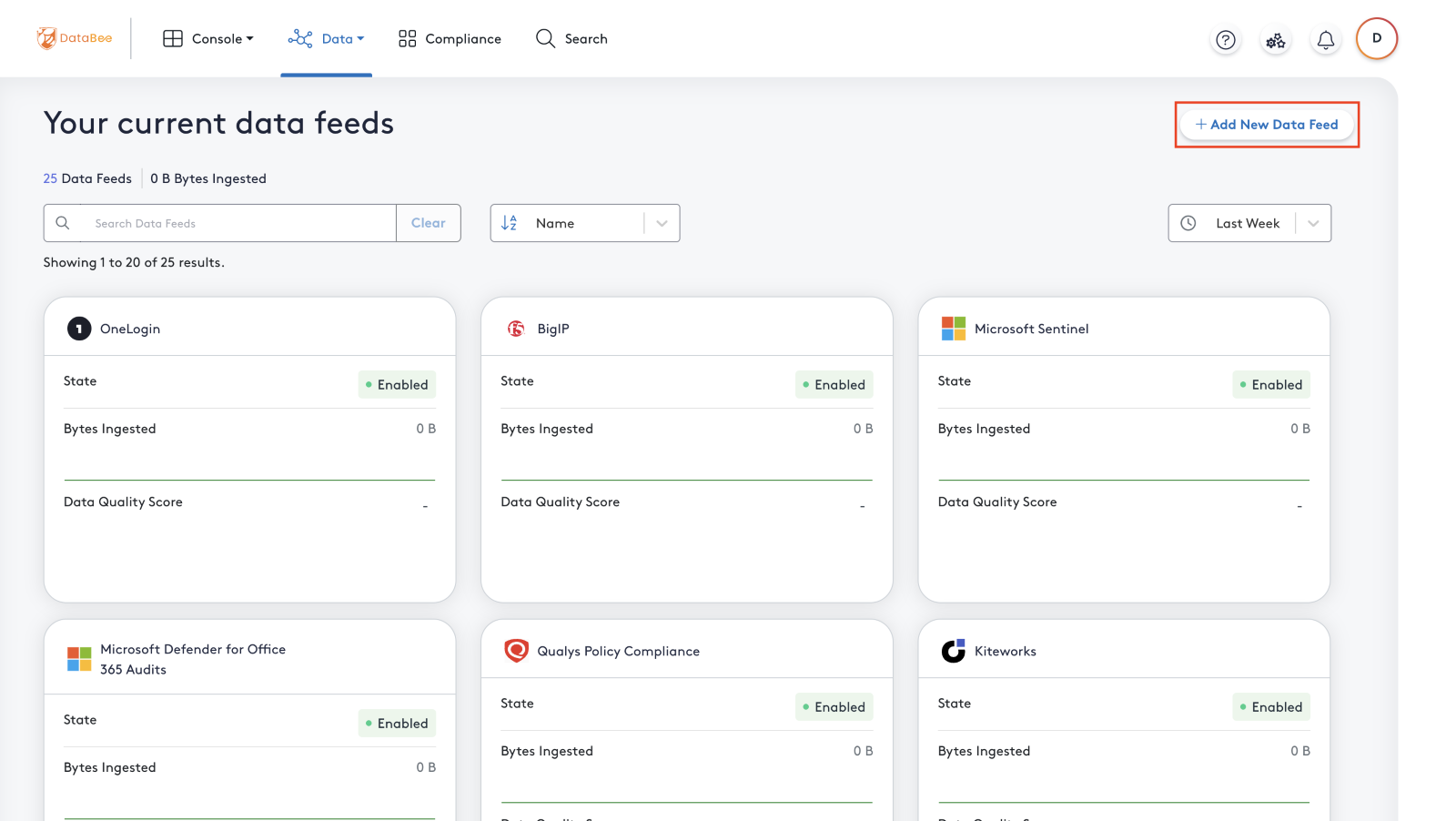
2. Search for the **JFrog** and click **JFrog Platform** it as shown below. 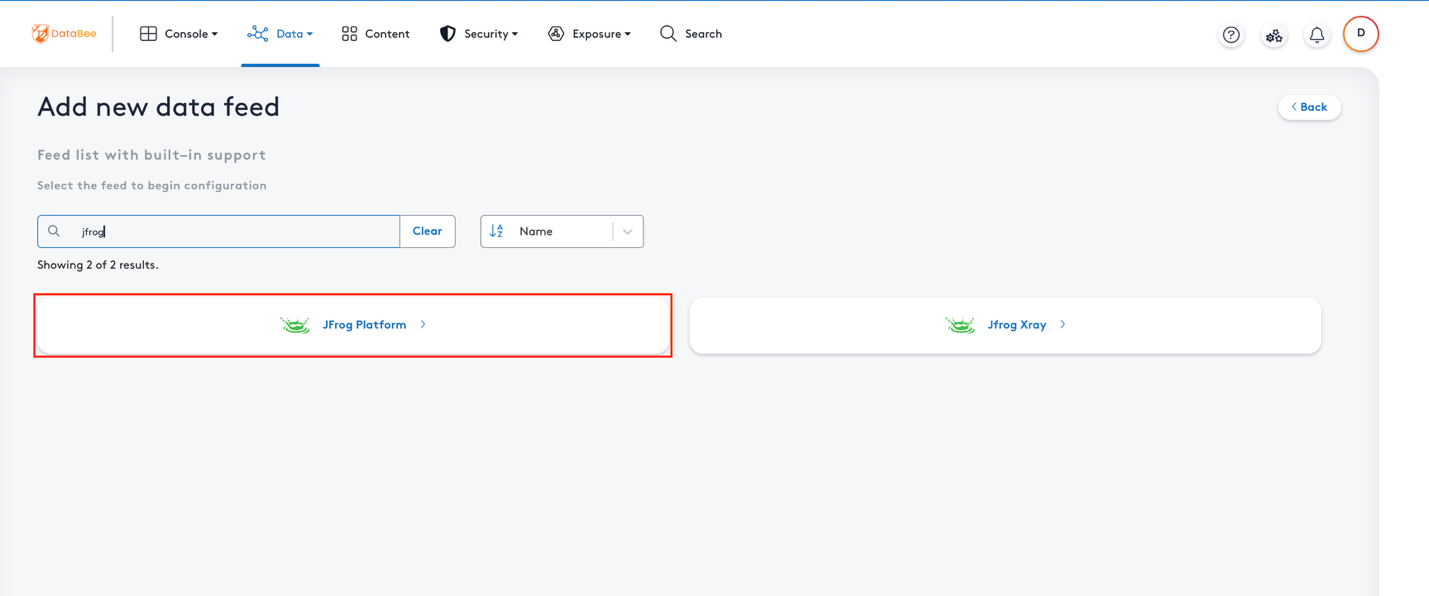
3. Click on the **Data Collector** for collection method. 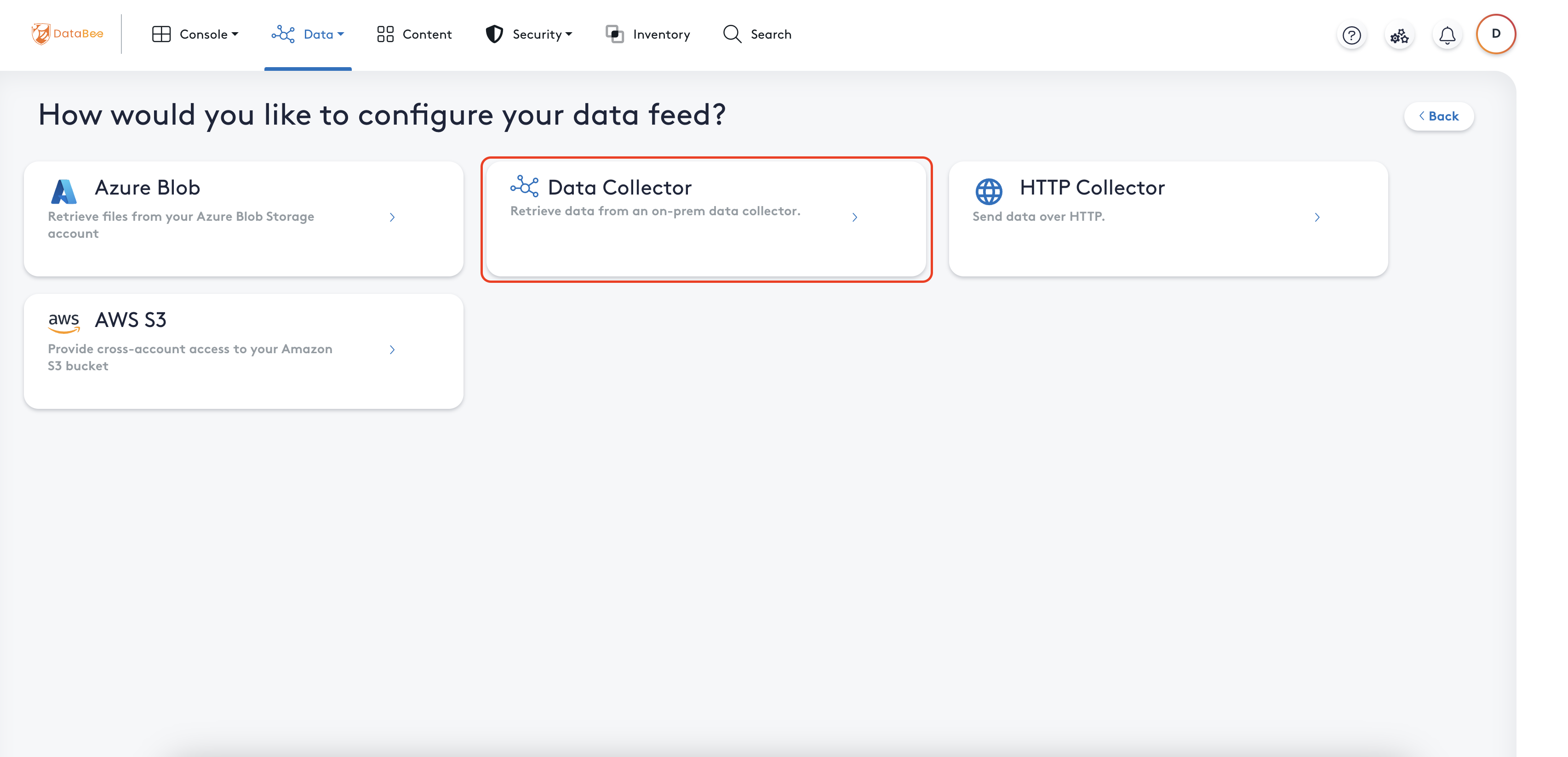
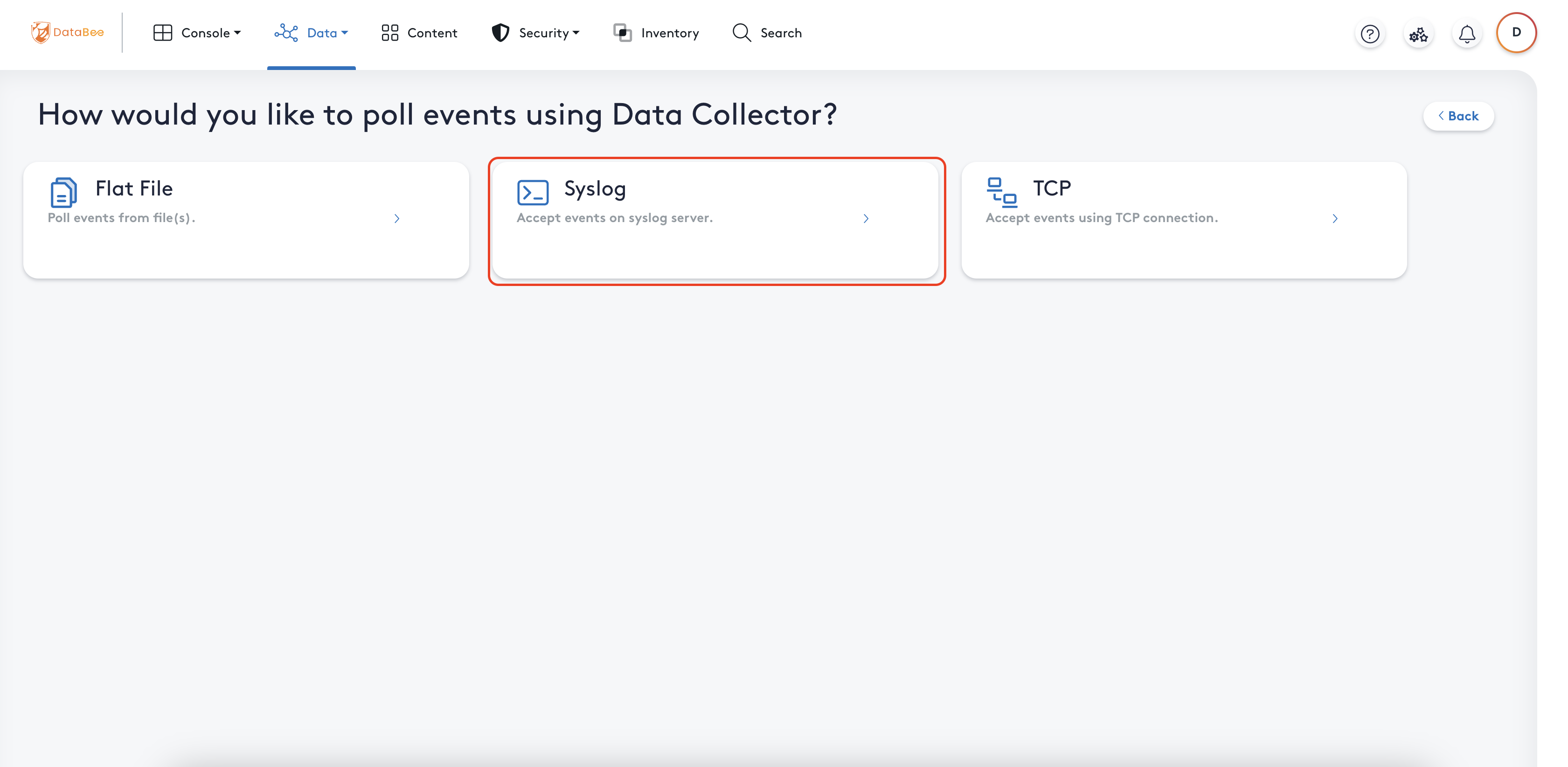
4. Click on the **Syslog** option.
5. Enter feed contact information and select data collector created from the previous step.
6. Click **Next**. 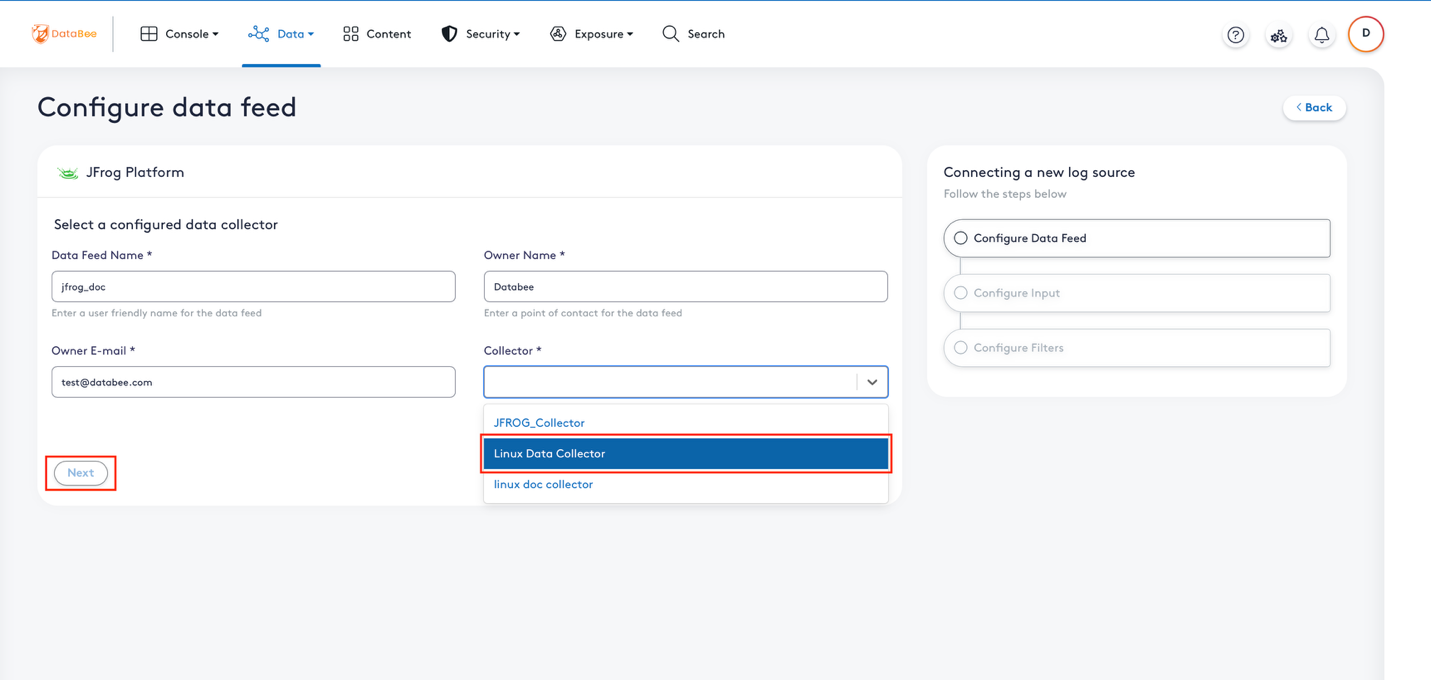
7. In the configuration page, confirm the following:
Click **Next**. 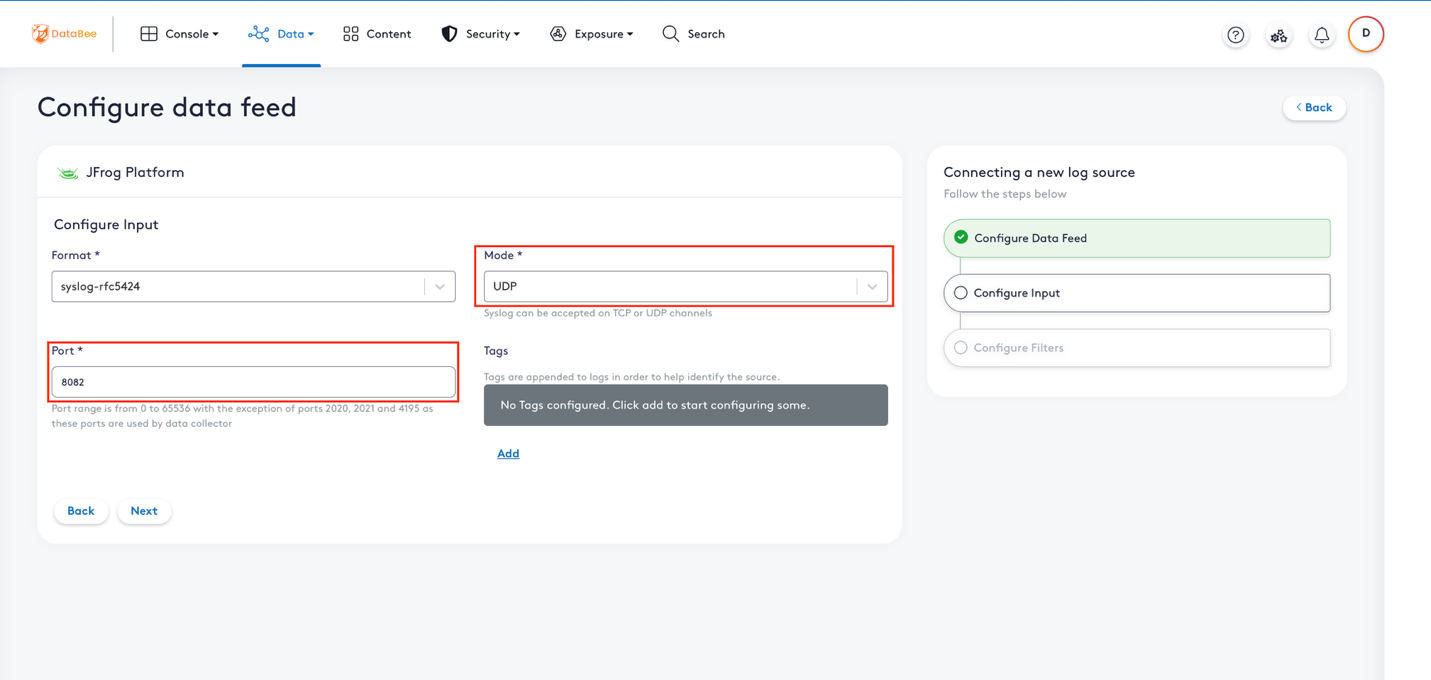
- Select the ‘Mode’ as **UDP** from the dropdown.
- Fill the ‘Port’ field with port configured during syslog configuration in host machine.
8. If you don’t want to filter logs based on syslog messages from host/clients then click on **Submit**.
- If you want to filter the message then click on **Add**. 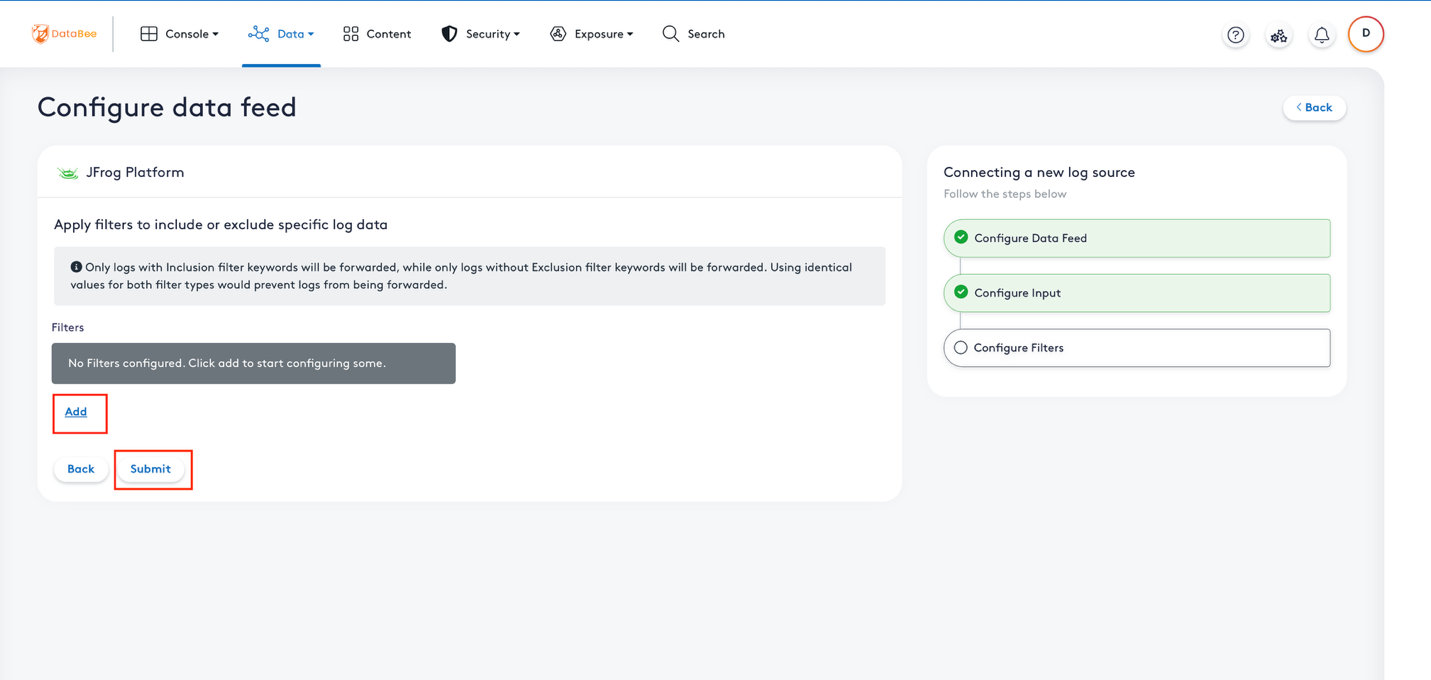
- You will see filters dropdown with two options i.e., Inclusion and Exclusion
Click on **Submit**. 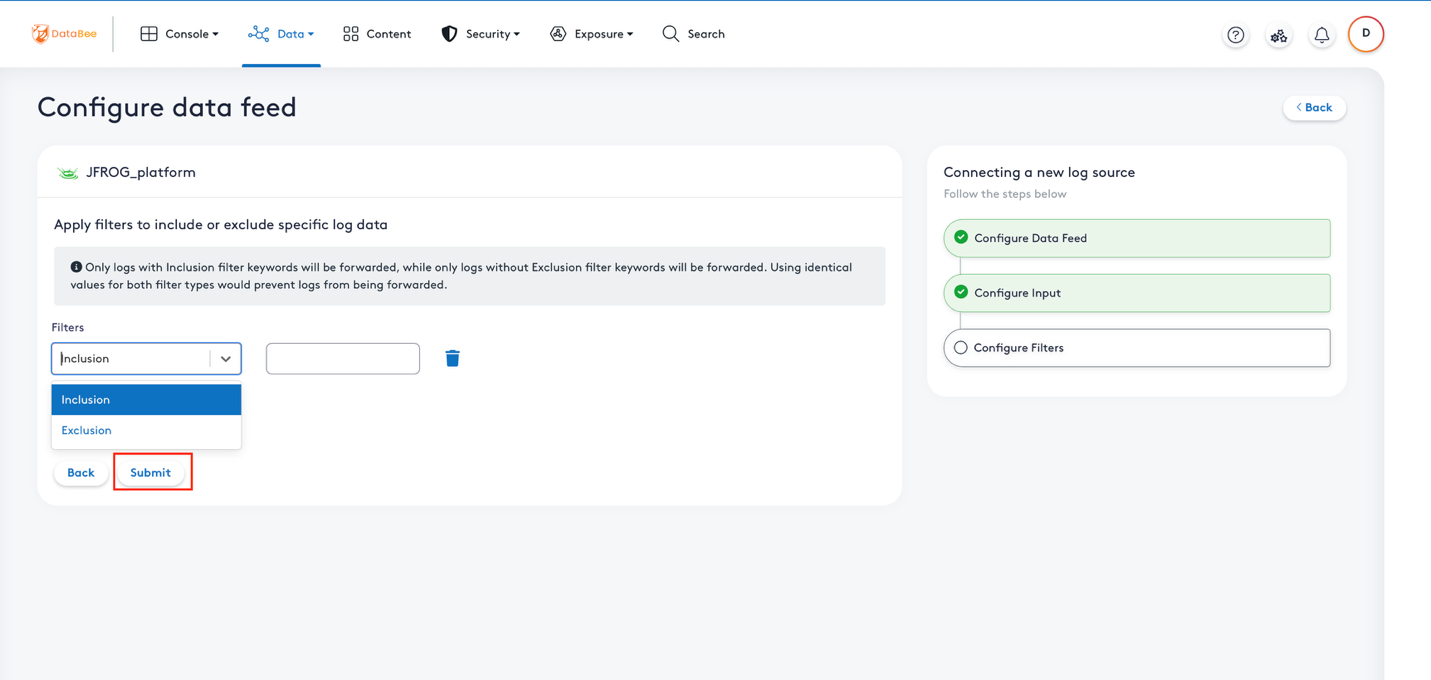
1. **Inclusion**: Provide keywords that you want to apply on syslog messages to filter which need to be processed in DataBee.
2. **Exclusion**: Provide keywords that you want to apply on syslog messages to filter which need not to be processed in DataBee.
## Troubleshooting Tips
- If you encounter any issues regarding log forwarding, refer to the [DataBee troubleshooting article](https://docs.databee.buzz/docs/troubleshooting) for detailed guidance.
#